Overview:
This update improves how employee identifiers are synced to our payroll system by automatically selecting the most appropriate ID based on your organisation’s setup. If custom Employee IDs are defined in Omni, these will now be prioritised; otherwise, the system will continue using the default System ID.
This ensures that organisations with established employee ID conventions can maintain consistency across payroll reports and payslips, while smaller teams can continue relying on system-generated IDs without disruption.
TABLE OF CONTENTS
How it works
The system now follows smart logic to determine what syncs to our payroll system. There is no migration required. Existing clients can input the Employee ID field and sync.
If Employee ID is empty in Omni
- System ID automatically syncs to our payroll system
If Employee ID has a value in Omni
- Employee ID automatically syncs to our payroll system (overrides System ID)
- This respects client custom employee numbering conventions
If Employee ID is updated in Omni
- The new Employee ID value syncs to our payroll system, updating the previous value that was synced
If Employee ID is cleared (set back to empty)
- System ID automatically syncs to our payroll system
Where Employee ID appears in our payroll system
Employee ID is displayed and used throughout our payroll system:
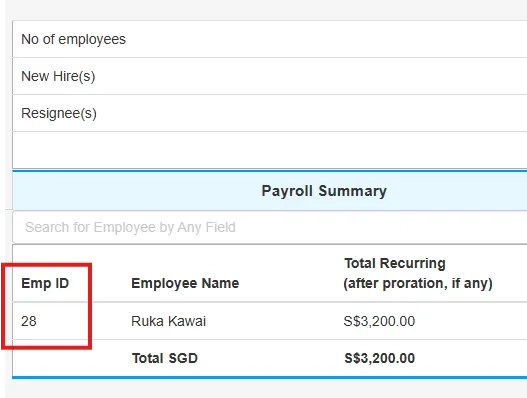
- Dashboards: Employee lists and summaries show Employee ID as a key identifier
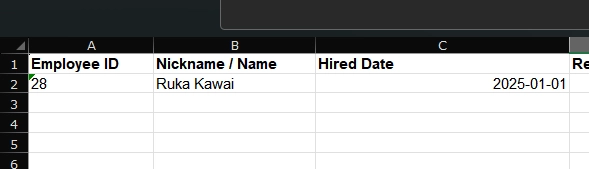
- Reports: Most payroll reports include Employee ID as a primary column for filtering and reference
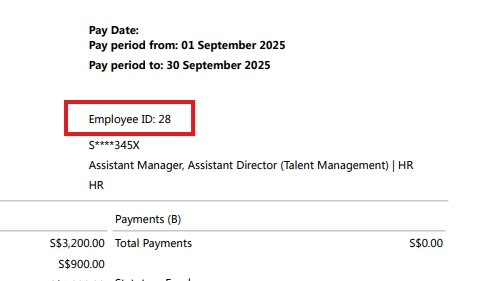
- Payslips: Employee ID appears prominently on every payslip (if enabled in settings)
Still Need Help?:
Reach out to our support team should you need further assistance.
Was this article helpful?
That’s Great!
Thank you for your feedback
Sorry! We couldn't be helpful
Thank you for your feedback
Feedback sent
We appreciate your effort and will try to fix the article