Overview:
This article explains how the system calculates Unpaid Time Off deductions from an employee’s salary.
The calculation is based on:
The employee’s monthly gross salary
Their working days or working hours in the affected month
Their effective work schedule
Any mid-month work schedule or salary changes
All calculations follow a per-day or per-half-day deduction method, depending on the leave taken.
TABLE OF CONTENTS
- Base Formula for Unpaid Time Off
- Mid-Month Work Schedule Change Scenarios
- Mid-Month Salary Change Scenarios
- Monthly Gross Salary Settings Guide in Payroll System
- [Singapore] MOM Compliance & Reference
- [Malaysia & Hong Kong] Company-level Proration Settings Override
Base Formula for Unpaid Time Off
- Daily Unpaid Leave Deduction Formula:
Monthly Gross Salary / Total Working Days in the Month - Half-Day Unpaid Leave Deduction Formula:
(Monthly Gross Salary / Total Working Days in the Month) / 2
Where:
Monthly Gross Salary = Sum of all recurring pay items that are tagged as Gross or have a Pro-ration = Yes
Total Working Days in the Month = The employee’s total working days for that month, calculated based on their effective work schedule
- Amount is always rounded to the nearest two decimal places
- Unpaid Leave Examples by Work Schedule
Here are the example simulation for 1 day unpaid leave for several work schedules
[A] Monday - Friday full days weekly
[B] Monday - Saturday full days weekly
[C] Monday - Thursday full days, Friday AM weekly
| Monthly gross rate of pay | Month / Year | [A] Working days | [A] Amount | [B] Working days | [B] Amount | [C] Working days | [C] Amount |
| $3,000 | Sept 2025 | 22 | $3,000 / 22 = $136.36 | 26 | $3,000 / 26 = $115.38 | 20 | $3,000 / 20 = $150.00 |
| $4,700 | Sept 2025 | 22 | $4,700 / 22 = $213.64 | 26 | $4,700 / 26 = $180.77 | 20 | $4,700 / 20 = $235.00 |
| $6,500 | Aug 2025 | 21 | $6,500 / 21 = $309.52 | 26 | $6,500 / 26 = $250.00 | 18.5 | $6,500 / 18.5 = $351.35 |
| $10,000 | Feb 2025 | 20 | $10,000 / 20 = $500.00 | 24 | $10,000 / 24 = $214.67 | 18 | $10,000 / 18 = $555.56 |
Mid-Month Work Schedule Change Scenarios
- If an employee's work schedule changes mid-month, the system automatically calculates total working days by summing working days across all effective schedules during that month.
Example 1: One work schedule in month
- Work schedule: 1-30 September 2025, Monday-Friday full days
- Working days in September = 22 days
- Monthly Gross Salary = $5,000
- Calculation: $5,000 ÷ 22 = $227.27 per day
Example 2: Two work schedules in month
- Work schedule 1: 1- 15 September 2025, Monday- Friday full days = 11 working days
- Work schedule 2: 16-30 September 2025, Monday-Wednesday full days = 7 working days
- Total working days in September 2025: 11 + 7 = 18 days
- Monthly Gross Salary = $5,000
- Calculation: $5,000 ÷ 18 = $277.78 per day
This employee's unpaid leave deduction is higher because they have fewer working days in the month due to the schedule change.
Example 3: Three work schedules in month
- Work schedule 1: 1-10 September 2025, Monday-Friday full days = 8 working days
- Work schedule 2: 11-18 September 2025, Monday-Wednesday full days = 3 working days
- Work schedule 3: 19-30 September 2025, Wednesday half-day only = 0.5 working days
- Total working days in September 2025: 8 + 3 + 0.5 = 11.5 days
- Monthly Gross Salary = $5,000
- Calculation: $5,000 ÷ 11.5 = $434.78 per day
This employee's per-day deduction is significantly higher because their work schedule was reduced dramatically mid-month, resulting in very few total working days.
Example 4: New Hire Mid Month Work Schedule
- Work schedule: 15-30 September 2025, Monday - Friday - full days
- Working days in September: 22 days (1-30 September 2025)
- Base salary record 1: 15-30 September 2025, $5,000 gross (Prorated in the Payroll System)
- Unpaid time off on 16 September 2025: $5,000 ÷ 22 = $227.27 per day
Mid-Month Salary Change Scenarios
- If an employee’s salary changes mid-month, the system determines the unpaid leave deduction based on the salary effective at the beginning of the month, not an averaged or blended monthly amount.
Example 1: No base salary changes in month
- Work schedule: 1-30 September 2025, Monday-Friday full days
- Working days in September: 22 days
- Base salary record: 1-30 September 2025, $5,000 gross
- Unpaid time off on 2 September 2025: $5,000 ÷ 22 = $227.27
- Salary for September: $5,000 - $227.27 = $4,772.73
Example 2: One base salary change in month
- Work schedule: 1-30 September 2025, Monday-Friday full days
- Working days in September = 22 days
- Base salary record 1: 1-14 September 2025, $5,000 gross = 10 working days
- Base salary record 2: 15-30 September 2025, $10,000 gross = 12 working days
- Unpaid time off on 2 September 2025: $5,000 ÷ 22 = $227.27 per day
- Unpaid time off on 16 September 2025: $5,000 ÷ 22 = $227.27 per day
Monthly Gross Salary Settings Guide in Payroll System
What Is Included in Monthly Gross Salary?
A pay item will count towards Monthly Gross Salary for unpaid leave calculation only if all conditions below are met:
- Pay item is Recurring
- Tagged as Gross
- Pro-ration = Yes
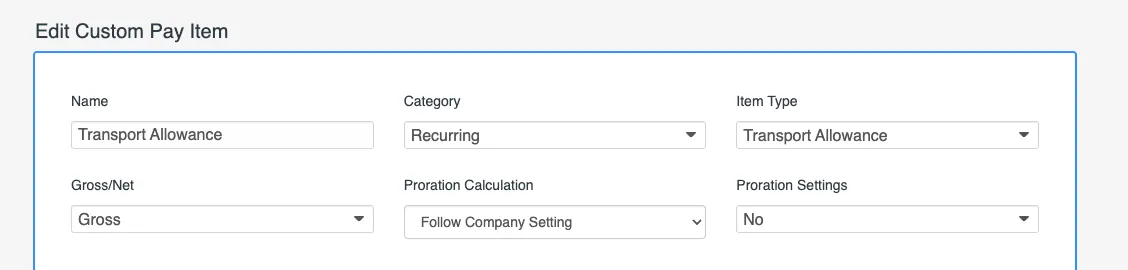
The table below illustrates examples of pay items that could contribute to gross salary based on their settings:
| Pay Item Name | Category | Item Type | Gross / Net | Pro-ration Settings | Count towards Monthly Gross |
| Allowance | Recurring | Allowance | Gross | Yes | ✅ |
| Incentives | Recurring | Incentive Allowance | Gross | Yes | ✅ |
| Allowance | Recurring | Allowance | Gross | No | ❎ |
| Housing Allowance | Recurring | Housing/Rental Allowance | Gross | No | ❎ |
| Shift Allowance | Ad-hoc | Allowance | Gross | No | ❎ |
| Reimbursements | Ad-hoc | Reimbursements | Net | No | ❎ |
[Singapore] MOM Compliance & Reference
According to Singapore MOM guidelines:
- Housing, Transport, and Meal allowances are not pro-rated for unpaid time off and are not considered part of Gross Salary
- In our payroll system, these pay items are created by default and has the Pro-ration setting as No, hence not counting towards Monthly Gross Salary
However, an admin can choose to change Pro-ration setting as Yes depending on your company policy. These pay items will then count towards Gross Salary.
Ministry of Manpower (Singapore) Reference Article for further reading:
Monthly and Daily Salary: Definitions and Calculations
[Malaysia & Hong Kong] Company-level Proration Settings Override
In Malaysia & Hong Kong, you may configure a company-level proration setting in the payroll system that determines how total working days are calculated.
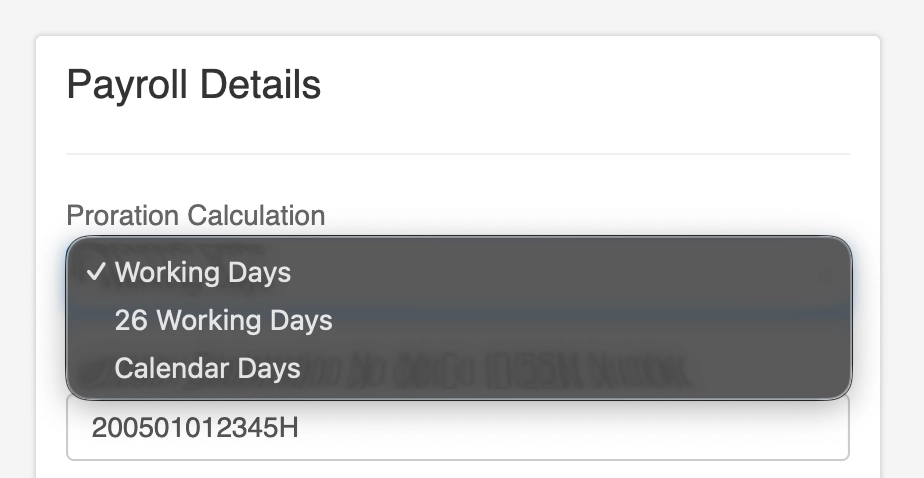
When enabled, this setting overrides the employee's individual work schedule, ensuring a consistent calculation method across all employees.
Option 1: Working Days (Default)
- Calculates total working days based on each employee’s assigned work schedule
- Follows the same logic as above examples
- Proration varies depending on the employee’s actual working days
Option 2: 26 Working Days (Malaysia only)
- Overrides the employee’s work schedule
- Uses a fixed 26 working days as the denominator for all employees
- Ensures consistent daily rate regardless of schedule changes
Option 3: Calendar Days (Malaysia and Hong Kong only)
- Overrides the employee’s work schedule
- Uses the total number of calendar days in the month as the denominator
- Daily rate varies depending on the month length
Calendar Days Example:
- September 2025 (30 days), Monthly Salary = $5,000
$5,000 ÷ 30 = $166.67 per day - August 2025 (31 days), Monthly Salary = $5,000
$5,000 ÷ 31 = $161.29 per day - February 2025 (28 days), Monthly Salary = $5,000
$5,000 ÷ 28 = $178.57 per day
The work schedule is fully ignored and all employees use the same calendar-day basis.
Still Need Help?
Reach out to our support team should you need further assistance.
Was this article helpful?
That’s Great!
Thank you for your feedback
Sorry! We couldn't be helpful
Thank you for your feedback
Feedback sent
We appreciate your effort and will try to fix the article