Overview
When an employee joins or leaves during the month, their monthly salary needs to be prorated so that they are paid only for the portion of the month they were actually on payroll. The partial salary amount is calculated based on the proration method applied to their salary. This article explains the three available methods and how the setting is configured.
TABLE OF CONTENTS
The three available methods
- Working Days: the monthly salary is prorated based on the employee's working day settings (i.e. the actual working days configured for their schedule).
- 26 Working Days: the monthly salary is prorated using a fixed assumption of 26 working days per month, regardless of how many working days actually fall in that particular month.
- Calendar Days: the monthly salary is prorated based on the actual number of calendar days in that month (28–31 days, depending on the month).
How this is set up
During implementation
When Omni HR sets up your payroll, this is configured based on the information you provide us upfront. As part of onboarding, you'll fill in the Employee Info Template, which includes a Company Statutory tab. In that tab, the Monthly Salary Proration Calculation field lets you select your company's method: Working Days, 26 Working Days, or Calendar Days.
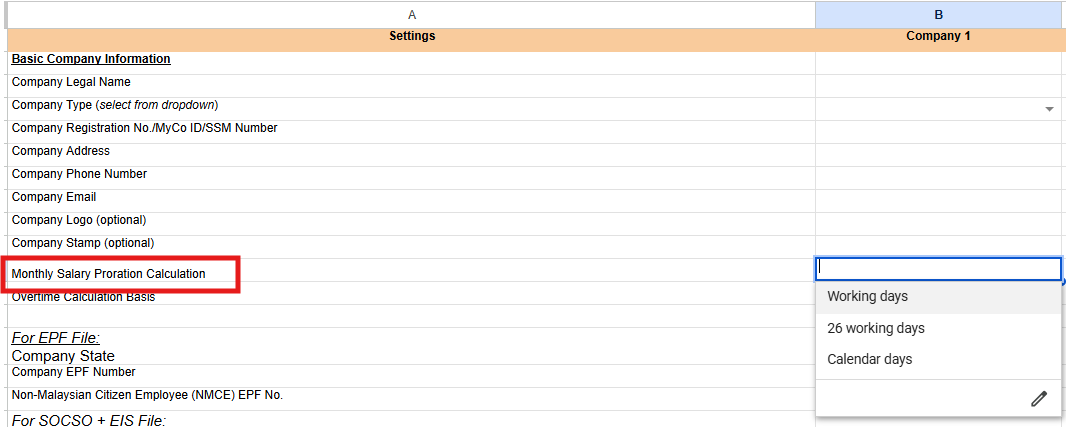
Once you've submitted the completed template, our implementation team applies your selected proration method directly in the payroll system — you won't need to configure anything further in our payroll system yourself at this stage.
Changing the proration method later
If your company's proration policy changes after go-live, you can update it directly in our payroll system:
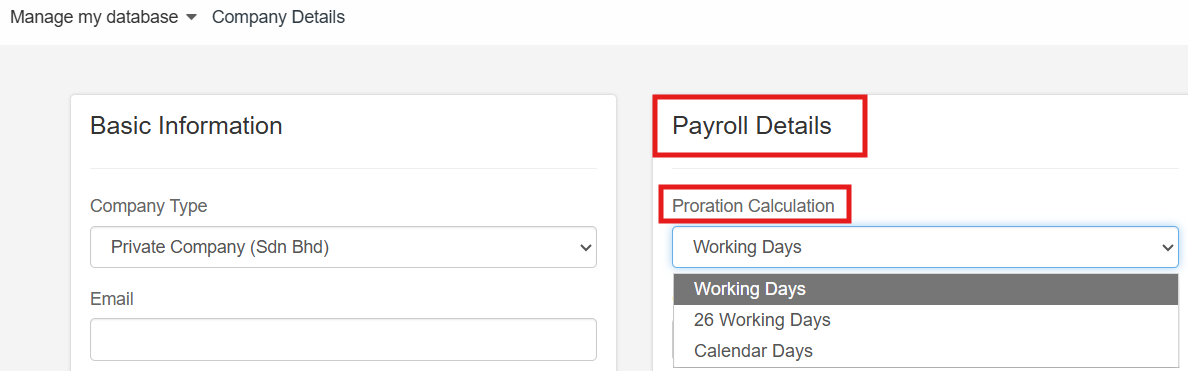
- In the payroll system, select Profiles -> Company Details from the header and click Edit.

- Scroll to the Payroll Details section, locate the Proration Calculation field and select the correct method: Working Days, 26 Working Days or Calendar Days.
- Save your changes.
Still Need Help?:
Reach out to our support team should you need further assistance.
Was this article helpful?
That’s Great!
Thank you for your feedback
Sorry! We couldn't be helpful
Thank you for your feedback
Feedback sent
We appreciate your effort and will try to fix the article