Overview:
Shared Parental Leave (SPL) is a statutory leave entitlement in Singapore that allows eligible working parents to share leave after the birth of their child. The leave can be shared between both parents and must be taken within 12 months from the child's date of birth (inclusive of the date of birth).
The statutory entitlement is:
- 6 weeks of Shared Parental Leave for children born from 1 April 2025 to 31 March 2026.
- 10 weeks of Shared Parental Leave for children born on or after 1 April 2026.
Unlike other statutory leave types, such as Maternity Leave and Paternity Leave, the actual Shared Parental Leave entitlement for each employee may differ depending on the sharing arrangement agreed upon by both parents. For example, one parent may transfer part of their entitlement to the other parent, resulting in different leave balances for each individual.
As these arrangements require employer verification and may vary from employee to employee, Shared Parental Leave is not available as a preset leave type in Omni HR.
This guide introduces the recommended methods for setting up Shared Parental Leave in Omni HR, along with the considerations for each approach. Each method comes with its own advantages and limitations, you can choose the option that best aligns with your company’s leave policy and administrative processes.
TABLE OF CONTENTS
- Option 1 (Recommended): Set up an ad-hoc leave type for Shared Parental Leave.
- Option 2: Set up a custom leave type for Shared Parental leave
- Option 3: Set up a Preset Leave type for Shared Parental Leave (Similar to Maternity/Paternity Leave Types Setup)
- Limitations
- Recommended Approach
Option 1 (Recommended): Set up an ad-hoc leave type for Shared Parental Leave.
- Admin can set up the ad hoc leave type for Shared Parental Leave.
- You may refer to this guide for setting up an ad hoc leave type: How to Configure One-Off Time-Off Entitlements (Ad Hoc / Off-in-Lieu)
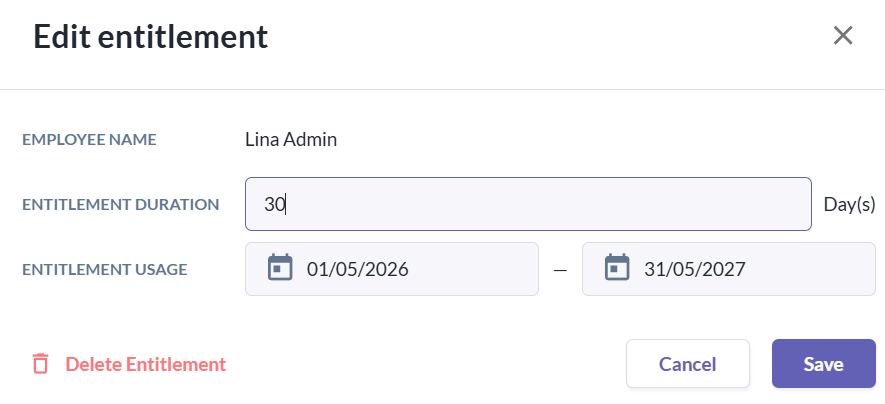
- Admin can grant a 6-week or 10-week (or specific duration if there is already a sharing arrangement) entitlement with the usage period based on child date of birth.
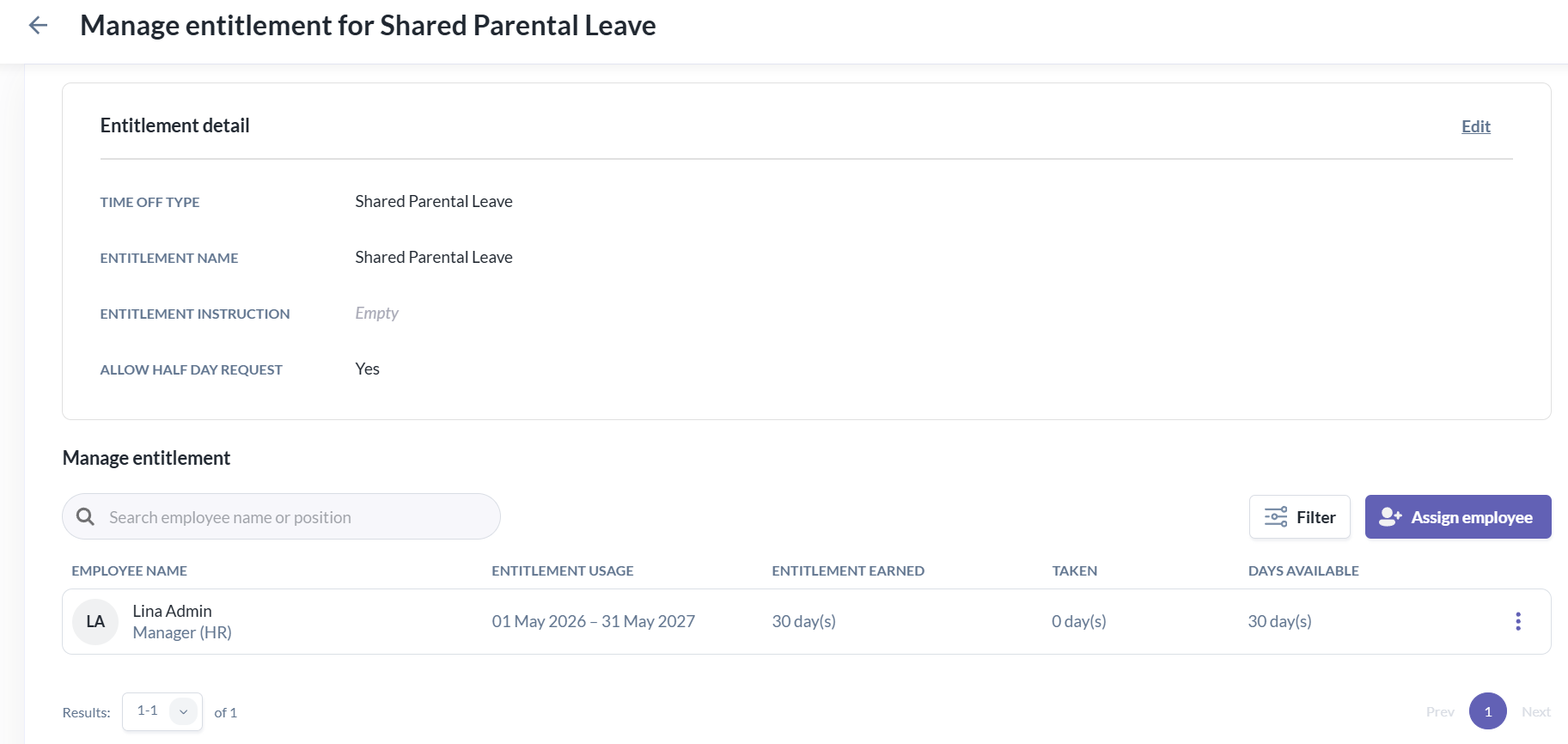
- If an employee is sharing or receiving entitlement from their spouse/partner, admins can manually adjust the leave balance accordingly based on the verified arrangement.
Option 2: Set up a custom leave type for Shared Parental leave
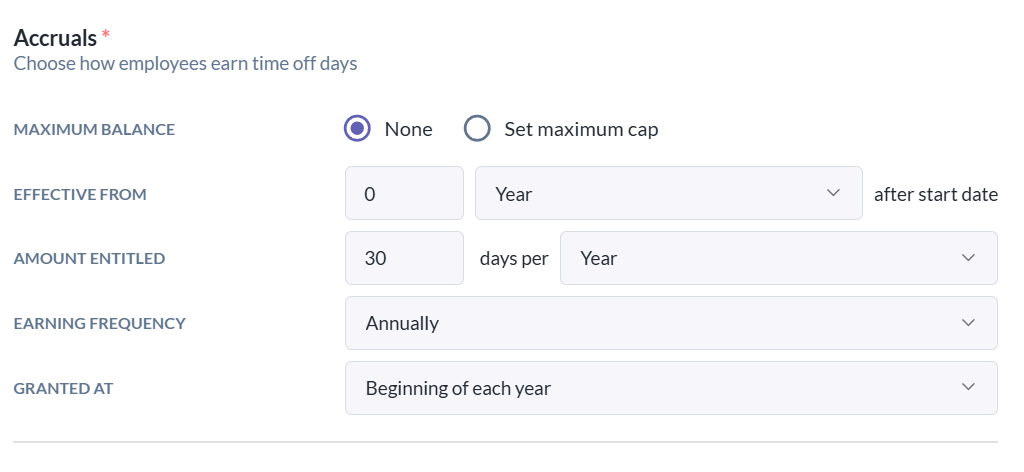
- Admins can set up a custom leave policy with a 6-week or 10-week entitlement that can be assigned to eligible employees.
- You may refer to this guide for setting up custom leave type and policy: How to Create and Assign Custom Time Off Policies
- You may refer to this guide for setting up custom leave type and policy: How to Create and Assign Custom Time Off Policies
Option 3: Set up a Preset Leave type for Shared Parental Leave (Similar to Maternity/Paternity Leave Types Setup)
- Admins can set up a preset leave type (e.g., Maternity or Paternity Leave) and assign it to eligible employees based on their parental status.
- The entitlement duration can be configured based on the applicable Shared Parental Leave entitlement (e.g., 6 weeks or 10 weeks for children who are Singapore Citizens, depending on the eligibility criteria).
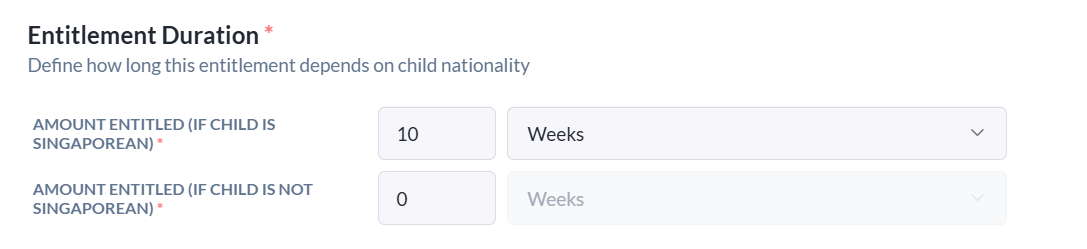
- Once the dependent information is added to the employee’s profile, the entitlement will be automatically populated by the system.
Limitations
| Option | Limitations |
|---|---|
| Option 1: Ad Hoc Leave Type (Recommended) |
|
| Option 2: Custom Leave Type |
|
| Option 3: Preset Leave Type |
|
Recommended Approach
Based on the current system capabilities and the nature of Shared Parental Leave, Option 1 is the recommended approach. This option provides admin with greater flexibility to grant and adjust entitlements based on each employee’s verified eligibility and sharing arrangement, while keeping the administration process straightforward.
Disclaimer:
Please note that this recommendation is specific to Shared Parental Leave, as it is not a fixed statutory entitlement like other Singapore statutory leave types (e.g. Maternity Leave or Paternity Leave). The recommended approach is based on the current system capabilities and the workflow that we believe best supports accurate administration. However, as every organization's processes and policies may differ, we recommend reviewing this approach internally to determine whether it best suits your operational and business requirements.
Still Need Help?:
Reach out to our support team should you need further assistance.
Was this article helpful?
That’s Great!
Thank you for your feedback
Sorry! We couldn't be helpful
Thank you for your feedback
Feedback sent
We appreciate your effort and will try to fix the article