Overview:
Timesheet locking allows authorized admins to prevent employees from making changes to attendance records within a specified period, helping ensure data remains accurate after payroll cutoffs or approval deadlines. By enabling this permission, organizations can control who can lock or unlock timesheets, strengthening governance and maintaining a reliable audit trail.
TABLE OF CONTENTS
New access control permission
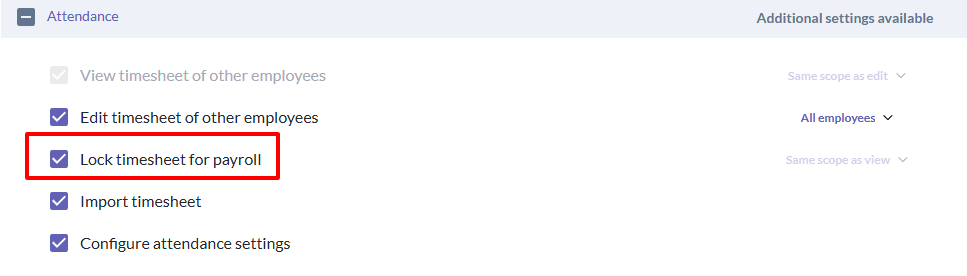
A new attendance permission has been added for the lock timesheet feature:
- Lock timesheet for payroll
This permission controls whether a user can access the lock timesheet action. This permission can be found under access to system functions in the access control settings.
Permission dependency
The Lock timesheet for payroll permission is dependent on View timesheet of other employees.
This means:
- the user must first have View timesheet of other employees enabled
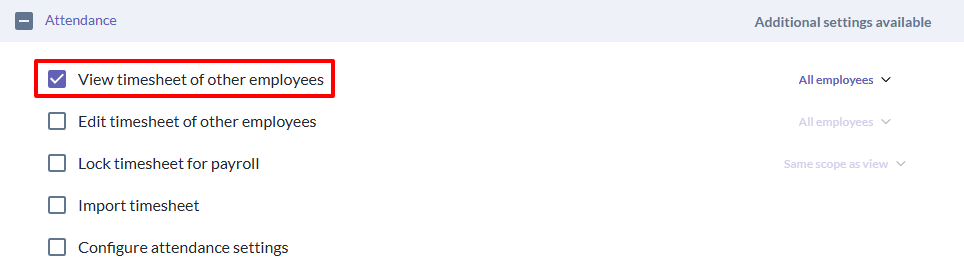
- only then can Lock timesheet for payroll be enabled for selection
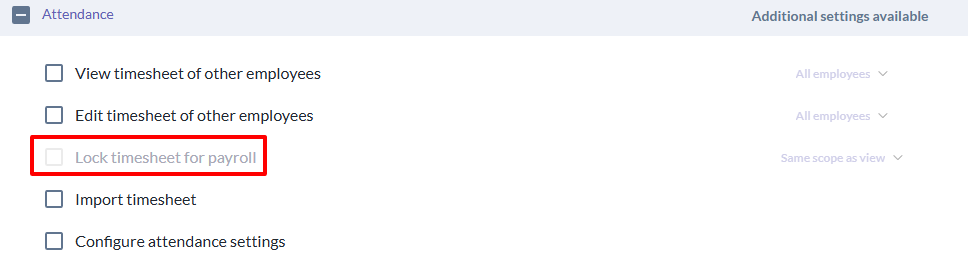
If View timesheet of other employees is not enabled:
- the lock timesheet permission remains unavailable / disabled
Still Need Help?:
Reach out to our support team should you need further assistance.
Was this article helpful?
That’s Great!
Thank you for your feedback
Sorry! We couldn't be helpful
Thank you for your feedback
Feedback sent
We appreciate your effort and will try to fix the article