Overview:
Employers are required to file an IR21 if a non-Singapore Citizen employee (including foreigners and Permanent Residents):
- Resigns or is terminated.
- Goes on an overseas posting.
- Plans to leave Singapore for more than three months.
This guide aims to show you the steps to take to generate and submit a IR21 form via the payroll system.
TABLE OF CONTENTS
Submitting IR21 form via payroll system: Step-by-Step
Step 1: Update the Employee's Termination Details in Omni HR
- Go to the employee's profile and use the quick action function to record the employee's termination
- Fill in the last day of work and tick the option Leaving country

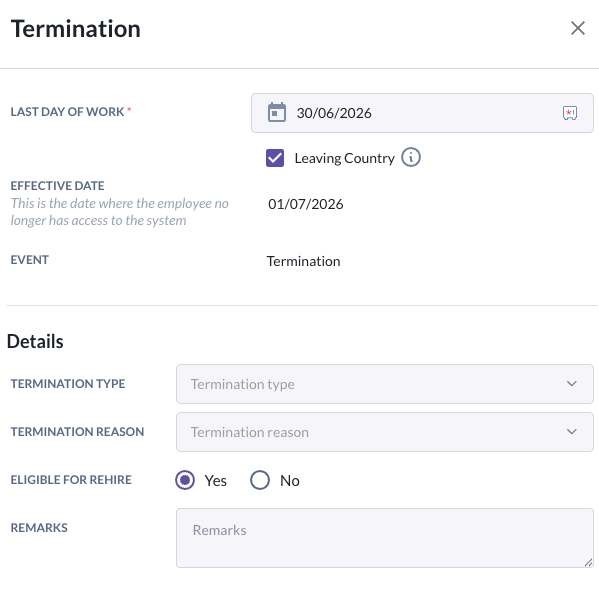
Step 2: Sync payroll data & ensure the final month pay run is processed
- This ensures accurate details are reflected in the IR21 submission.
- For guide on how to run payroll, click here
Step 3: Navigate to the IR21 form within the payroll system
- Go to Payroll > IR21.
- Select the YA of assessment and the resigned employee
Note: YA of assessment refers to income earned in the preceding calendar year (e.g. YA 2027 covers income from 1 Jan - 31 Dec 2026)
- Click Generate IR21 for 20XX
Step 4: Review and complete the form
- Check all the pre-filled information and complete any remaining fields required by IRAS.
- Review the filled form for accuracy before submission
Step 5: Submit to IRAS
- Click on Submit to IRAS button directly within the payroll system. To process the submission, you will be required to login with your Singpass account.
You will receive a confirmation notice once the submission is successful.
Important Notes:
- File Early: Submit the IR21 form to IRAS at least one month before the employee's last day of work or impending departure.
- Withhold Monies: Withhold all final monies due to the employee (e.g., salary, bonus, leave pay, and gratuities) from the date of resignation or departure notice until IRAS issues a "Clearance Directive".
Still Need Help?:
Reach out to our support team should you need further assistance.
Was this article helpful?
That’s Great!
Thank you for your feedback
Sorry! We couldn't be helpful
Thank you for your feedback
Feedback sent
We appreciate your effort and will try to fix the article