Overview:
Previously, overtime was calculated purely based of timing deviation from the work schedule shift times and not by actual total hours worked.
This meant:
This meant:
- Overtime could be triggered even when total hours worked did not exceed scheduled hours.
- Employees could appear to earn overtime without actually working additional time.
Old Overtime Calculations:
- Overtime is calculated when there are clock-in and clock-out records that are out of the work schedule shift start and end times.
Example:
Shift Schedule: Mon-Fri (9.00AM to 5.00PM)
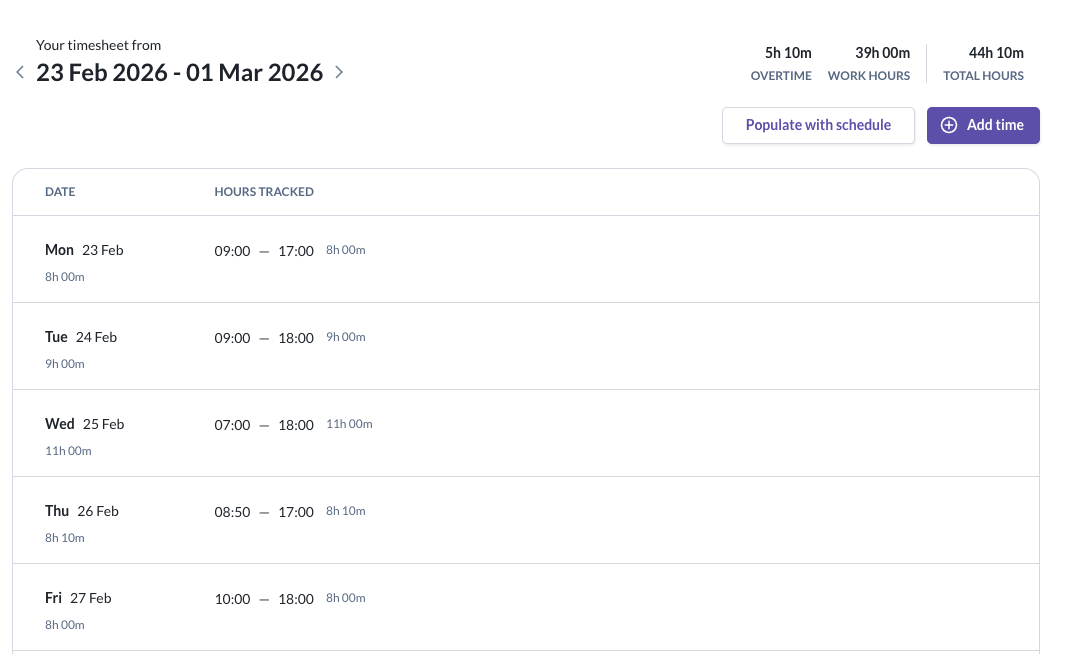
- In the above example of a time sheet, you will see that overtime is calculated total: 5 hours & 10 minutes
- Mon: 0 hours
- Tues: 1 hour
- Wed: 3 hour
- Thu: 10 minutes
- Fri: 1 hour
- In this current logic, overtime was still awarded to this employee on Friday, even though he worked his contractual hours of 8 Hours, solely because he clocked in and out, 1 hour later than his shift start & end time.
New Overtime Calculations:
- Effective 1 Mar 2026, overtime will be calculated based on actual total hours worked - depending on the overtime policy settings configured;
- based on work schedule [All hours worked beyond work schedule shift duration i.e. 8 hours is classified as overtime]
- based on fixed daily or weekly hour thresholds [All hours worked beyond daily or weekly threshold is classified as overtime]
- no overtime [All hours worked are regular, working hours]
Admins will also have the options to set grace period and time-off rounding logic, to ensure more accurate time tracking and pay out of overtime hours.
Still Need Help?:
Reach out to our support team should you need further assistance.
Was this article helpful?
That’s Great!
Thank you for your feedback
Sorry! We couldn't be helpful
Thank you for your feedback
Feedback sent
We appreciate your effort and will try to fix the article